> ## Documentation Index
> Fetch the complete documentation index at: https://docs.flashduty.com/llms.txt
> Use this file to discover all available pages before exploring further.
# Filter Conditions
> Filter specific alerts or incidents through condition matching, used in escalation rules, silence rules, inhibit rules, routing rules, label enhancement, and more
## Where Are Filter Conditions Used?
***
Filter conditions apply to the following scenarios:
| Scenario | Description |
| --------------------- | --------------------------------------------------------------------------------------------------------------------------------------------- |
| **Escalation Rules** | A single channel can have multiple escalation rules, each with different filter conditions to set different assignees for different incidents |
| **Silence Rules** | Set filter conditions to match specific incidents; matching incidents will be silenced |
| **Inhibit Rules** | Set filter conditions to match newly triggered incidents and existing active incidents; when new incidents match, they are inhibited |
| **Alert Grouping** | Set filter conditions to match specific alerts and configure new grouping dimensions for them |
| **Routing Rules** | When using Integration Center alert integrations, set global routing rules to route different alerts to specific channels |
| **Label Enhancement** | Set filter conditions to match specific alerts; matching alerts generate labels according to rules |
| **Alert Processing** | Set filter conditions to match specific alerts; matching alerts are processed according to rules |
## How to Configure Filter Conditions?
***
### Rule Design
Flashduty On-call abstracts the entire filter condition system, aiming for minimal configuration while meeting most scenario requirements.
The overall judgment logic consists of multiple condition groups:
* **Conditions within a group**: `AND` relationship—each condition must match for the group to match
* **Between groups**: `OR` relationship—any group matching means overall match
Within each condition, there's a field, operator (oper), and target values:
* **Match** (`IN`): Target can have multiple values; if any value satisfies the condition, that condition matches
* **Not Match** (`NOTIN`): Target can have multiple values; if all values don't satisfy the condition, that condition matches
Only the two operators above are supported: **match** (`IN`) and **not match** (`NOTIN`). There are no separate `equal`, `regex`, or `contains` operators. The specific matching semantics are determined by the target-value format described below.
#### Available fields
Filter condition keys fall into two categories:
| Category | Key | Meaning |
| ------------------ | ---------------- | ---------------------------------------------------------------------------- |
| Built-in attribute | `data_source_id` | Integration; value is the integration instance ID |
| Built-in attribute | `severity` | Severity (Critical / Warning / Info) |
| Built-in attribute | `title` | Alert / incident title |
| Built-in attribute | `description` | Alert / incident description |
| Dynamic label | `labels.` | Any label key prefixed with `labels.`, e.g., `labels.service`, `labels.host` |
Historically, `alert_severity` (alert severity) and `incident_severity` (incident severity) were used as two separate fields. They are now unified as `severity`. When loading legacy rules, the system automatically migrates both keys to `severity` — you don't need to edit anything manually; simply saving the rule will persist the new key.
Target values in conditions are all strings, supporting **exact**, **regex**, **wildcard**, **IP range**, and **numeric comparison** matching methods.
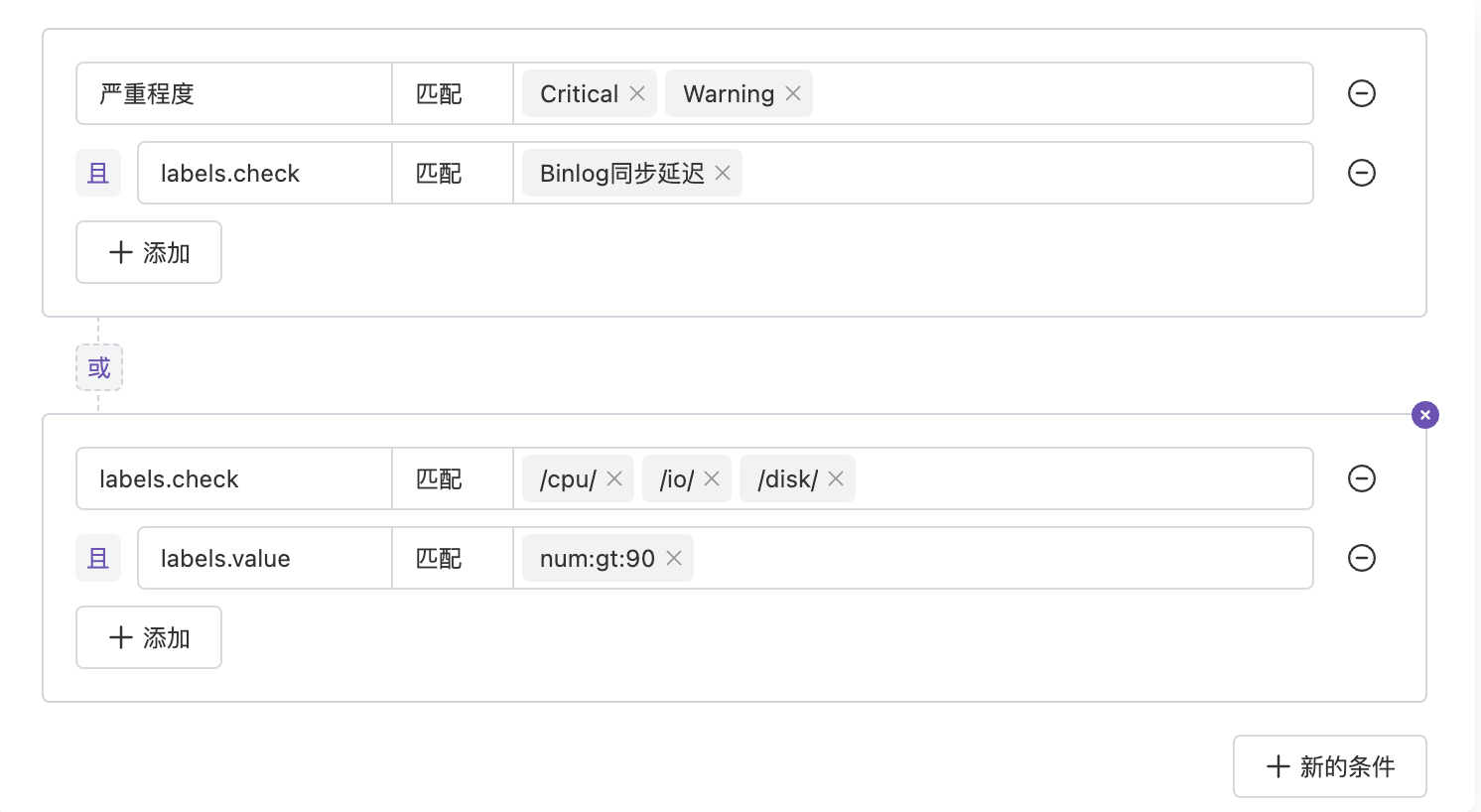
As shown above, we have two condition groups, each with two conditions, and conditions have multiple match values. The expression is:
```
( severity == Critical|Warning && labels.check == Binlog Sync Delay )
or
( labels.check == /cpu/|/io/|/disk/ && labels.value == num:gt:90 )
```
### Matching Methods
When a value string has `/` as prefix and suffix, the entire value is recognized as **regex**.
**Example**:
* `labels.check`: `/outage/` — matches when check label contains "outage"
Flashduty uses `RE2` regex specification platform-wide. Some `Perl` syntax may not match. You can use AI Chatbot to generate expressions and verify at [RE2 Playground](https://re2js.leopard.in.ua/).
When a value string contains `*` or `?` without `/` prefix and suffix, the entire value is recognized as **wildcard**.
* `*` matches zero or more characters
* `?` matches a single character
**Example**:
* `labels.check`: `outage*` — matches when check label starts with "outage"
You can use `*` to check if a field **exists** or **doesn't exist**:
* Field `matches *`: Requires the field to exist
* Field `doesn't match *`: Requires the field not to exist
When a value has `cidr` as prefix, the entire value is recognized as **IP range**.
**Example**:
* `labels.host`: `cidr:10.0.0.206/24` — matches when ip label is within "10.0.0.206/24" range
This filter condition doesn't apply in: incident list filtering by labels, alert list filtering by labels, and alert inhibit rule filtering for active alerts.
When a value has `num:[gt|ge|lt|le]:` as prefix, the entire value is recognized as **numeric comparison**.
| Prefix | Meaning |
| ------ | --------------------- |
| `gt` | Greater than |
| `ge` | Greater than or equal |
| `lt` | Less than |
| `le` | Less than or equal |
**Example**:
* `labels.value`: `num:ge:90` — matches when value label is greater than or equal to 90
This filter condition doesn't apply in: incident list filtering by labels, alert list filtering by labels, and alert inhibit rule filtering for active alerts.
When a value doesn't match any of the above formats, it's treated as **exact matching**. Only when strings are exactly equal does it match.
## FAQ
***
Flashduty On-call receives large volumes of data. To ensure system stability, the system only searches the most recent 500 alert events from the past 24 hours for label deduplication. Therefore, extracted labels may change dynamically, or no labels may be extracted if there's no new data in the past 24 hours.
In this case, **you can manually enter labels**.
Flashduty uses `RE2` regex specification platform-wide. Some `Perl` syntax may not match. You can use AI Chatbot to generate expressions and verify at [RE2 Playground](https://re2js.leopard.in.ua/).