> ## Documentation Index
> Fetch the complete documentation index at: https://docs.flashduty.com/llms.txt
> Use this file to discover all available pages before exploring further.
# Templates
> Notification templates control the content format of incident notifications. The system uses templates to render incident information and send notifications when assigning incidents.
**Plan requirement**: This feature requires an On-call Pro or higher subscription. [Learn more](https://flashcat.cloud/flashduty/price/)
## Use Cases
The system uses templates when assigning incidents in the following scenarios:
| Scenario | Description |
| :----------------------- | :-------------------------------------------------------------------------------------- |
| Manual incident creation | Manually create and assign incident |
| Auto-generated incident | Report alert event, system auto-generates incident, assigns per matched escalation rule |
| Reassignment | After incident creation, manually change assignment |
| Escalation | Based on escalation rule settings, system auto-escalates assignment |
| Reopen assignment | After incident closed and reopened, reassigns per previous settings |
The system uses [Golang template syntax](https://pkg.go.dev/html/template@go1.18.1) to parse data, supporting logic, loops, pipelines, and common functions. For more functions, refer to [sprig function library](https://github.com/flashcatcloud/sprig/tree/flashcat).
For security reasons, the following sprig functions are disabled. Using them in a template causes a `function "xxx" not defined` parse error:
| Category | Disabled functions |
| :--------------------- | :---------------------------------------------------------------------------------------------------------------------------------------------------- |
| Environment | `env`, `expandenv` |
| Network lookup | `getHostByName` |
| Cryptography | `bcrypt`, `htpasswd`, `derivePassword`, `encryptAES`, `decryptAES` |
| Certificate generation | `genPrivateKey`, `buildCustomCert`, `genCA`, `genCAWithKey`, `genSelfSignedCert`, `genSelfSignedCertWithKey`, `genSignedCert`, `genSignedCertWithKey` |
| Randomness | `randBytes`, `uuidv4`, `randAlphaNum`, `randAlpha`, `randAscii`, `randNumeric`, `randInt`, `shuffle` |
| Error raising | `fail` |
If you need a unique identifier inside a template, use incident variables such as `{{.IncidentID}}` or `{{.LabelsMD5}}`. If you need environment-specific values, pass them in via alert labels or field mappings instead of reading host environment variables from the template.
## Configuring Templates
Go to **Template Management** page, click **Create Custom Template** or **Copy Default Template**
Edit content by notification channel, can reference fields from the variable list below
Click **Save** to complete creation
### Apply Template
Go to **Channel** → **Escalation Rules**, click **Edit**
In rule configuration, select **which template** to use for notifications
Click **Save** to complete configuration. See [Configure Escalation Rules](/en/on-call/channel/escalation-rule)
## Variable Reference
### Reference Examples
```go theme={null}
// Reference incident title
{{.Title}}
// Reference creator name
{{.Creator.PersonName}}
// Reference resource label value
{{.Labels.resource}}
// Reference label with "." (e.g., "A.B")
{{index .Labels "A.B"}}
```
### Incident Variables
Complete variable list for incident objects:
| Field | Type | Required | Description |
| :----------------- | :----------- | :------: | :----------------------------------------------------------- |
| ID | string | ✓ | Incident ID |
| `Title` | string | ✓ | Incident title |
| `Description` | string | ✓ | Incident description, may be empty |
| DetailUrl | string | ✓ | Incident detail page URL |
| Num | string | ✓ | Incident short identifier, for visual recognition only |
| `IncidentSeverity` | string | ✓ | Severity: Critical / Warning / Info |
| IncidentStatus | string | ✓ | Incident status: Critical / Warning / Info / Ok |
| `Progress` | string | ✓ | Processing progress: Triggered / Processing / Closed |
| `StartTime` | int64 | ✓ | Trigger time, Unix timestamp in seconds |
| LastTime | int64 | | Latest event time, Unix timestamp in seconds |
| EndTime | int64 | | Recovery time, Unix timestamp in seconds |
| SnoozedBefore | int64 | | Snooze end time, Unix timestamp in seconds |
| AckTime | int64 | | First acknowledgment time, Unix timestamp in seconds |
| CloseTime | int64 | | Close time, Unix timestamp in seconds |
| Creator | Person | | Creator info, doesn't exist for auto-generated |
| Closer | Person | | Closer info, doesn't exist for auto-recovered |
| AssignedTo | Assignment | | Assignment configuration |
| Responders | \[]Responder | | Responders list |
| ChannelID | int64 | | Channel ID |
| ChannelName | string | | Channel name |
| GroupMethod | string | | Grouping method: n (none) / p (rule-based) / i (intelligent) |
| `Labels` | map | | Label KV, both Key and Value are strings |
| AlertCnt | int64 | ✓ | Associated alert count |
| Alerts | \[]Alert | | Associated alert details |
| FireType | string | | Notification type: fire (notify) / refire (loop notify) |
| IsFlapping | bool | | Whether in flapping state |
| Impact | string | | Incident impact, filled after closure |
| RootCause | string | | Incident root cause, filled after closure |
| Resolution | string | | Resolution, filled after closure |
### Related Objects
| Field | Type | Required | Description |
| :----------- | :----- | :------: | :------------ |
| person\_id | int64 | ✓ | Person ID |
| person\_name | string | ✓ | Person name |
| email | string | ✓ | Email address |
| Field | Type | Required | Description |
| :--------------- | :------- | :------: | :----------------------------------------------------- |
| PersonIDs | \[]int64 | | Person ID list, only exists when assigned by person |
| EscalateRuleID | string | | Escalation rule ID |
| EscalateRuleName | string | | Escalation rule name |
| LayerIdx | int | | Assignment level, starts from 0 |
| Type | string | ✓ | Assignment type: assign / reassign / escalate / reopen |
| Field | Type | Required | Description |
| :------------- | :----- | :------: | :--------------------------------------------- |
| PersonID | int64 | ✓ | Person ID |
| PersonName | string | ✓ | Person name |
| Email | string | ✓ | Email address |
| AssignedAt | int64 | ✓ | Assignment time, Unix timestamp in seconds |
| AcknowledgedAt | int64 | | Acknowledgment time, Unix timestamp in seconds |
| Field | Type | Required | Description |
| :------------ | :----- | :------: | :------------------------------------------- |
| Title | string | ✓ | Alert title |
| Description | string | ✓ | Alert description, may be empty |
| AlertSeverity | string | ✓ | Severity: Critical / Warning / Info |
| AlertStatus | string | ✓ | Alert status: Critical / Warning / Info / Ok |
| StartTime | int64 | ✓ | Trigger time, Unix timestamp in seconds |
| LastTime | int64 | | Latest event time, Unix timestamp in seconds |
| EndTime | int64 | | Recovery time, Unix timestamp in seconds |
| Labels | map | | Label KV |
## FAQ
* Manually created incidents have no labels
* Auto-created incidents have labels, same as the first merged alert's labels
Go to **Incident List** → view incident details to see all label information.
When creating custom templates, the system uses mock data to check syntax. Mock data covers limited scenarios; rendering may fail at runtime, and system falls back to default template.
Recommend checking if variable exists before referencing:
```go theme={null}
// ❌ Wrong: Read label directly
{{.Labels.resource}}
// ✅ Recommended: Check then read
{{if .Labels.resource}}{{.Labels.resource}}{{end}}
```
Use `toHtml` function to handle:
```go theme={null}
// Escape HTML characters
{{toHtml .Title}}
// Render with first non-empty value
{{toHtml .Title .TitleEnglish}}
```
```go theme={null}
// date function: Convert timestamp to readable format
{{date "2006-01-02 15:04:05" .StartTime}}
// ago function: Convert time difference to readable format (e.g., "5 minutes ago")
{{ago .StartTime}}
```
Add `$` before external variable:
```go theme={null}
{{range .Responders}}
{{if eq $.Progress "Triggered"}}
【Pending】{{.Email}}
{{end}}
{{end}}
```
Use `index` function:
```go theme={null}
{{index .Labels "obj.instance"}}
```
```go theme={null}
// alertLabels: Get deduplicated array
{{alertLabels . "resource"}}
// joinAlertLabels: Deduplicate and join with delimiter as string
{{joinAlertLabels . "resource" ", "}}
```
```go theme={null}
// Complete iteration
{{range $k, $v := .Labels}}
{{$k}} : {{toHtml $v}}
{{end}}
// Exclude single label
{{range $k, $v := .Labels}}
{{if ne $k "resource"}}
{{$k}} : {{toHtml $v}}
{{end}}
{{end}}
// Exclude multiple labels
{{range $k, $v := .Labels}}
{{if not (in $k "resource" "body_text")}}
{{$k}} : {{toHtml $v}}
{{end}}
{{end}}
```
Use `jsonGet` function to extract values by path from valid JSON. Syntax reference at [gjson.dev](https://gjson.dev/).
```go theme={null}
// Extract detail_url field from rule_note label
{{jsonGet .Labels.rule_note "detail_url"}}
// Extract name field of first element in JSON array
{{jsonGet .Labels.slice "0.name"}}
// Iterate array, match instanceId field where userId==7777
{{jsonGet .Labels.rule_note "#(userId==7777)#.instanceId"}}
```
**imageSrcToURL**: Convert image\_key or URL to accessible address (for Dingtalk/Slack App)
```go theme={null}
{{ $root := . }}
{{ range $i, $v := .Images }}
{{ $imageURL := imageSrcToURL $root $v.Src }}
{{ if $imageURL }}{{ end }}
```
**transferImage**: Upload image to third-party platform (for Feishu/Lark App)
```go theme={null}
{{ $root := . }}
{{ range $i, $v := .Images }}
{{ $transferURL := transferImage $root $v.Src }}
{{ if $transferURL }}{{ end }}
```
Image size cannot exceed 10 MB, supports JPG, PNG, WEBP, GIF, BMP formats.
| Function | Description | Example |
| :---------- | :------------------------------ | :----------------------------------- |
| `and` | Logical AND | `{{if and (eq .A "x") (eq .B "y")}}` |
| `or` | Logical OR | `{{if or (eq .A "x") (eq .A "y")}}` |
| `not` | Logical NOT | `{{if not (eq .A "x")}}` |
| `eq` | Equal | `{{if eq .A "x"}}` |
| `ne` | Not equal | `{{if ne .A "x"}}` |
| `gt` / `ge` | Greater than / Greater or equal | `{{if gt .AlertCnt 1}}` |
| `lt` / `le` | Less than / Less or equal | `{{if lt .AlertCnt 10}}` |
* Function list: [functions.go](https://github.com/flashcatcloud/sprig/blob/master/functions.go#L97)
* Usage examples: Check corresponding `_test.go` files, e.g., [date\_test.go](https://github.com/flashcatcloud/sprig/blob/master/date_test.go)
## Channel Templates
Different notification channels support different template formats and limitations.
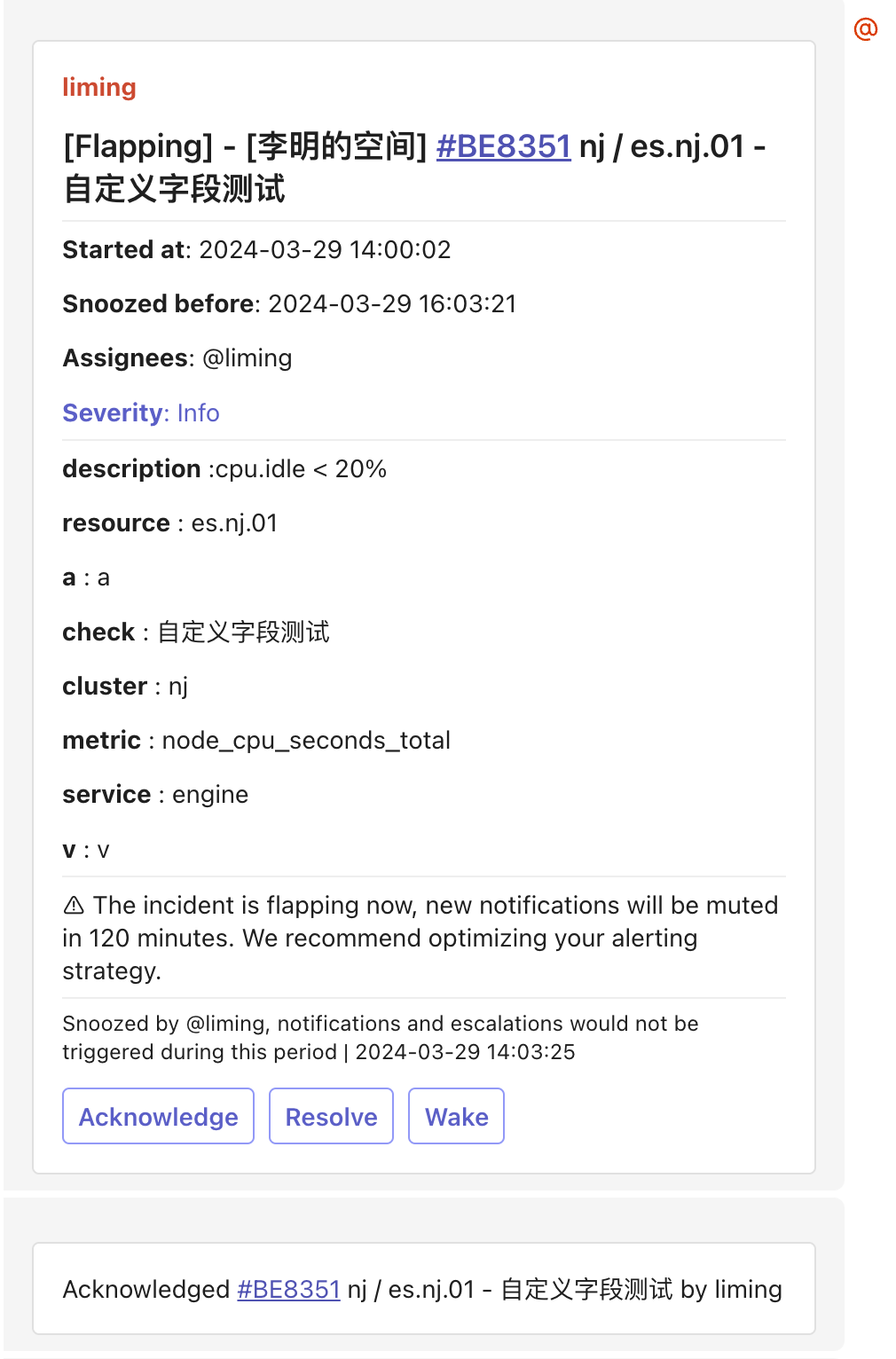
Requires [Feishu/Lark integration](/en/on-call/integration/instant-messaging/lark) configured first. Supports message card format; system auto-removes empty render lines caused by non-existent labels.
**Default Template** (render all labels):
```go theme={null}
{{if .Labels.body_text}}{{.Labels.body_text}}{{else if .Description}}{{.Description}}{{end}}
{{if .Labels.resource}}**resource** : {{(joinAlertLabels . "resource" ", ")}}{{end}}
{{range $k, $v := .Labels}}
{{if not (in $k "resource" "body_text" "body_text_with_table")}}**{{$k}}** : {{$v}}{{end}}{{end}}
{{ $root := . }}
{{ range $i, $v := .Images }}
{{ $transferURL := transferImage $root $v.Src }}
{{ if $transferURL }}{{ end }}
```
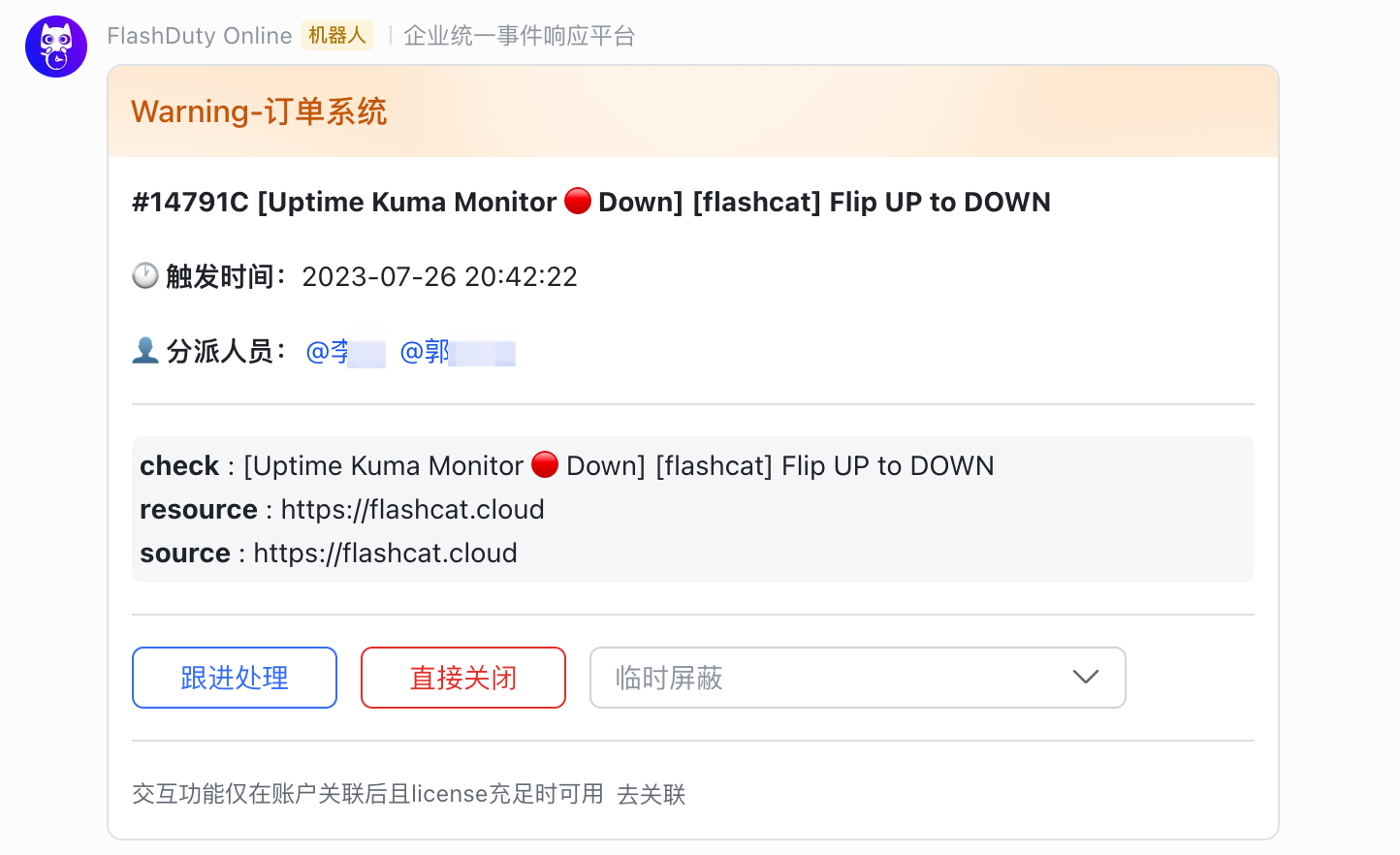 **Minimal Template** (show key labels only):
```go theme={null}
{{if (index .Labels "resource")}}resource:{{toHtml (joinAlertLabels . "resource" ", ")}}{{end}}
{{if (index .Labels "check")}}check:{{toHtml (index .Labels "check")}}{{end}}
{{if (index .Labels "metric")}}metric:{{index .Labels "metric"}}{{end}}
{{if (index .Labels "trigger_value")}}trigger_value:{{index .Labels "trigger_value"}}{{end}}
{{if (index .Labels "region")}}region:{{index .Labels "region"}}{{end}}
{{if (index .Labels "cluster")}}cluster:{{index .Labels "cluster"}}{{end}}
{{if (index .Labels "service")}}service:{{index .Labels "service"}}{{end}}
{{if (index .Labels "env")}}env:{{index .Labels "env"}}{{end}}
```
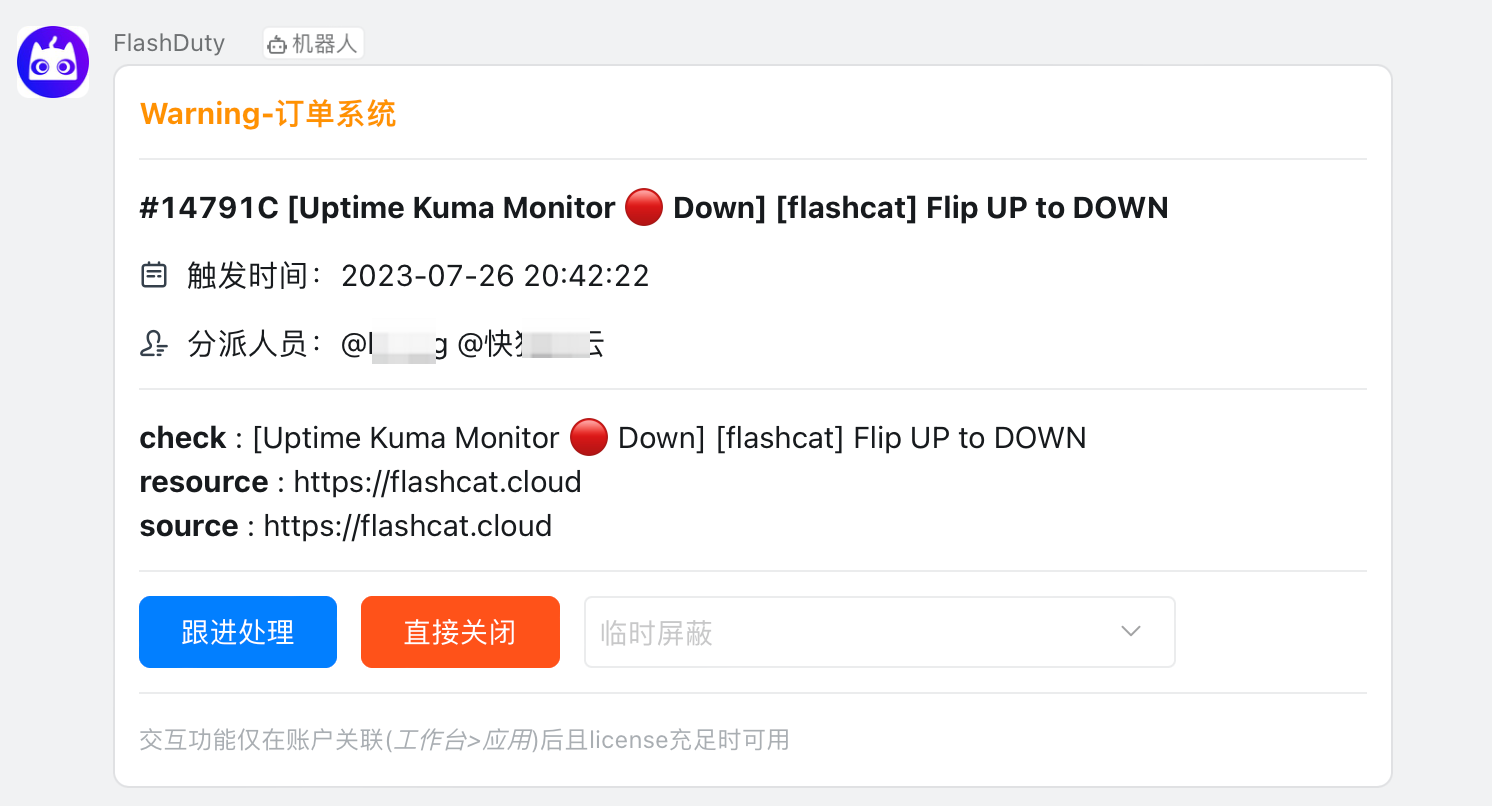
Requires [Dingtalk integration](/en/on-call/integration/instant-messaging/dingtalk) configured first. Supports message card format; system auto-removes empty render lines.
**Default Template**:
```go theme={null}
{{if .Description}}**description** :{{toHtml .Labels.body_text .Description}}{{end}}
{{if .Labels.resource}}**resource** : {{toHtml (joinAlertLabels . "resource" ", ")}}{{end}}
{{range $k, $v := .Labels}}
{{if not (in $k "resource" "body_text")}}**{{$k}}** : {{toHtml $v}}{{end}}{{end}}
{{ $root := . }}
{{ range $i, $v := .Images }}
{{ $imageURL := imageSrcToURL $root $v.Src }}
{{ if $imageURL }}{{ end }}{{ end }}
```
**Minimal Template** (show key labels only):
```go theme={null}
{{if (index .Labels "resource")}}resource:{{toHtml (joinAlertLabels . "resource" ", ")}}{{end}}
{{if (index .Labels "check")}}check:{{toHtml (index .Labels "check")}}{{end}}
{{if (index .Labels "metric")}}metric:{{index .Labels "metric"}}{{end}}
{{if (index .Labels "trigger_value")}}trigger_value:{{index .Labels "trigger_value"}}{{end}}
{{if (index .Labels "region")}}region:{{index .Labels "region"}}{{end}}
{{if (index .Labels "cluster")}}cluster:{{index .Labels "cluster"}}{{end}}
{{if (index .Labels "service")}}service:{{index .Labels "service"}}{{end}}
{{if (index .Labels "env")}}env:{{index .Labels "env"}}{{end}}
```
Requires [Dingtalk integration](/en/on-call/integration/instant-messaging/dingtalk) configured first. Supports message card format; system auto-removes empty render lines.
**Default Template**:
```go theme={null}
{{if .Description}}**description** :{{toHtml .Labels.body_text .Description}}{{end}}
{{if .Labels.resource}}**resource** : {{toHtml (joinAlertLabels . "resource" ", ")}}{{end}}
{{range $k, $v := .Labels}}
{{if not (in $k "resource" "body_text")}}**{{$k}}** : {{toHtml $v}}{{end}}{{end}}
{{ $root := . }}
{{ range $i, $v := .Images }}
{{ $imageURL := imageSrcToURL $root $v.Src }}
{{ if $imageURL }}{{ end }}{{ end }}
```
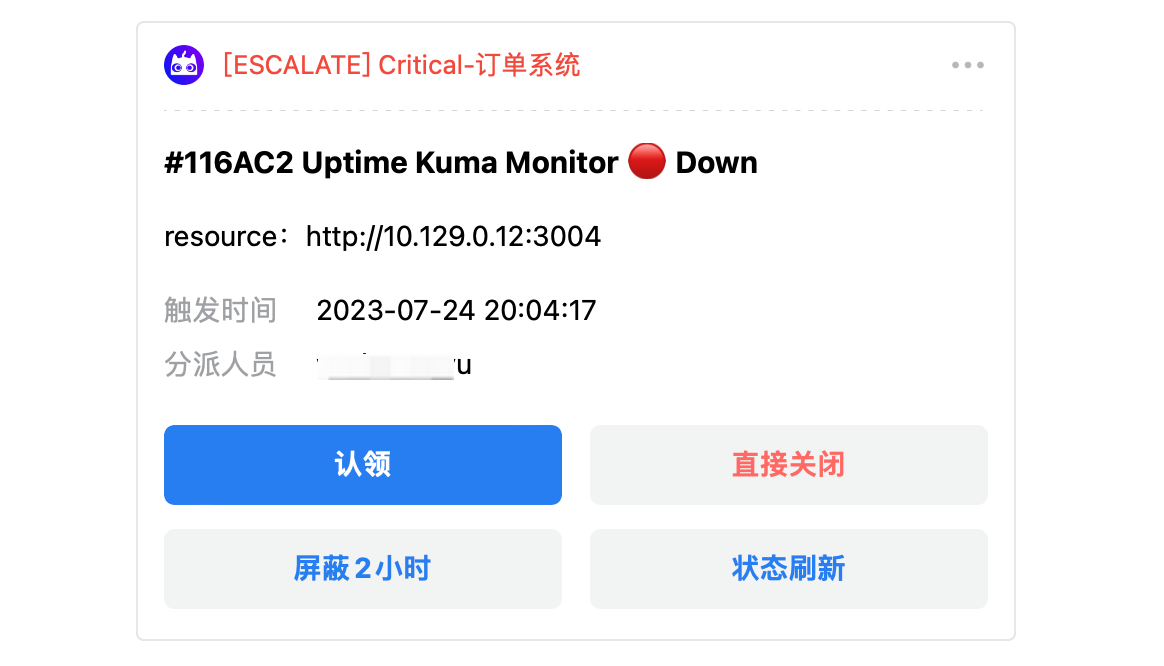
 Requires [WeCom integration](/en/on-call/integration/instant-messaging/wecom) configured first. Supports message card format.
WeCom limits card length, template render area max **8 lines**, excess will be hidden.
**Default Template**:
```go theme={null}
{{if (index .Labels "resource")}}resource:{{toHtml (joinAlertLabels . "resource" ", ")}}{{end}}
{{if (index .Labels "metric")}}metric:{{index .Labels "metric"}}{{end}}
{{if (index .Labels "trigger_value")}}trigger_value:{{index .Labels "trigger_value"}}{{end}}
{{if (index .Labels "region")}}region:{{index .Labels "region"}}{{end}}
{{if (index .Labels "cluster")}}cluster:{{index .Labels "cluster"}}{{end}}
{{if (index .Labels "service")}}service:{{index .Labels "service"}}{{end}}
{{if (index .Labels "env")}}env:{{index .Labels "env"}}{{end}}
```
Requires [WeCom integration](/en/on-call/integration/instant-messaging/wecom) configured first. Supports message card format.
WeCom limits card length, template render area max **8 lines**, excess will be hidden.
**Default Template**:
```go theme={null}
{{if (index .Labels "resource")}}resource:{{toHtml (joinAlertLabels . "resource" ", ")}}{{end}}
{{if (index .Labels "metric")}}metric:{{index .Labels "metric"}}{{end}}
{{if (index .Labels "trigger_value")}}trigger_value:{{index .Labels "trigger_value"}}{{end}}
{{if (index .Labels "region")}}region:{{index .Labels "region"}}{{end}}
{{if (index .Labels "cluster")}}cluster:{{index .Labels "cluster"}}{{end}}
{{if (index .Labels "service")}}service:{{index .Labels "service"}}{{end}}
{{if (index .Labels "env")}}env:{{index .Labels "env"}}{{end}}
```
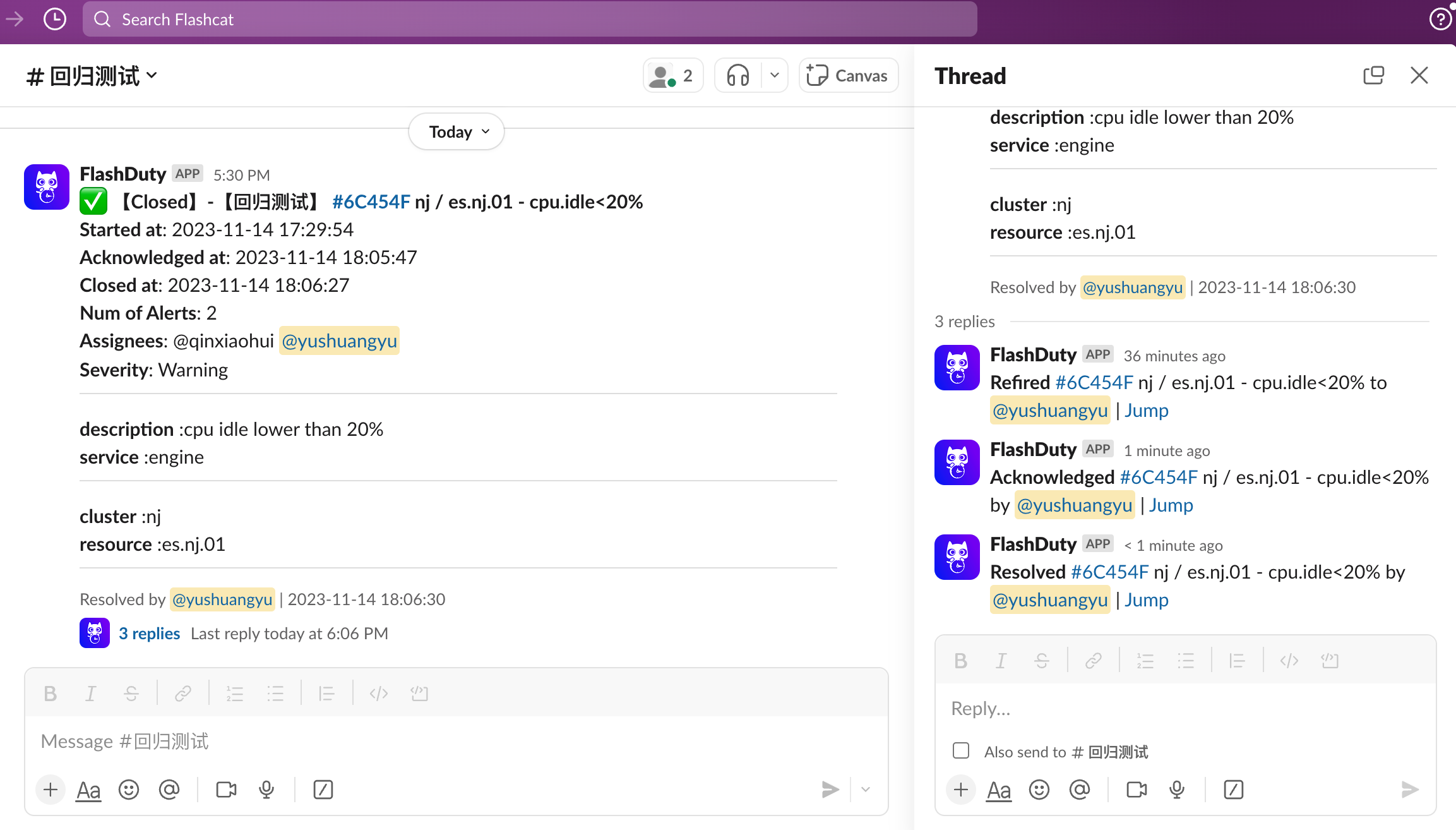
 Requires [Slack integration](/en/on-call/integration/instant-messaging/slack) configured first. Max message length \~15000 characters, truncated if exceeded.
When displaying images, separate images from other content with `---`, format starts with `
{{ end }}
{{ end }}
```
Requires [Slack integration](/en/on-call/integration/instant-messaging/slack) configured first. Max message length \~15000 characters, truncated if exceeded.
When displaying images, separate images from other content with `---`, format starts with `
{{ end }}
{{ end }}
```
 Requires [Teams integration](/en/on-call/integration/instant-messaging/microsoft-teams) configured first. Max message \~28KB, errors if exceeded.
**Default Template**:
```go theme={null}
{{if .Description}}**description** :{{toHtml .Labels.body_text .Description}}{{end}}
{{if .Labels.resource}}**resource** : {{toHtml (joinAlertLabels . "resource" ", ")}}{{end}}
{{range $k, $v := .Labels}}
{{if not (in $k "resource" "body_text" "body_text_with_table")}}**{{$k}}** : {{toHtml $v}}{{end}}{{end}}
```
Requires [Teams integration](/en/on-call/integration/instant-messaging/microsoft-teams) configured first. Max message \~28KB, errors if exceeded.
**Default Template**:
```go theme={null}
{{if .Description}}**description** :{{toHtml .Labels.body_text .Description}}{{end}}
{{if .Labels.resource}}**resource** : {{toHtml (joinAlertLabels . "resource" ", ")}}{{end}}
{{range $k, $v := .Labels}}
{{if not (in $k "resource" "body_text" "body_text_with_table")}}**{{$k}}** : {{toHtml $v}}{{end}}{{end}}
```
 ## Bot Templates
Template formats supported by group chat bots.
Supports message card, rich text, and plain text formats. Max message 4000 bytes, truncated if exceeded.
```json theme={null}
{
"msg_type": "interactive",
"card": {
"config": {
"wide_screen_mode": true,
"enable_forward": true
},
"header": {
"template": "{{if eq .IncidentSeverity \"Critical\"}}red{{else if eq .IncidentSeverity \"Warning\"}}orange{{else}}yellow{{end}}",
"title": {
"content": "{{fireReason .}}INC #{{.Num}} {{toHtml .Title}}",
"tag": "plain_text"
}
},
"elements": [{
"tag": "div",
"fields": [{
"text": {
"tag": "lark_md",
"content": "**🏢 Channel:**{{.ChannelName}}"
}
},
{
"text": {
"tag": "lark_md",
"content": "**⏰ Trigger Time:**{{date \"2006-01-02 15:04:05\" .StartTime}}"
}
}]
},
{
"tag": "action",
"actions": [{
"tag": "button",
"text": { "tag": "plain_text", "content": "Details" },
"type": "primary",
"url": "{{.DetailUrl}}"
},
{
"tag": "button",
"text": { "tag": "plain_text", "content": "Acknowledge" },
"type": "primary",
"url": "{{.DetailUrl}}?ack=1"
}]
}]
}
}
```
```json theme={null}
{
"msg_type": "post",
"post": {
"zh_cn": {
"title": "{{if eq .IncidentSeverity \"Critical\"}}🔴{{else if eq .IncidentSeverity \"Warning\"}}⚠️{{else}}ℹ️{{end}} {{fireReason .}}INC #{{.Num}} {{toHtml .Title}}",
"content": [
[{"tag": "text", "text": "🏢 "}, {"tag": "text", "text": "Channel: ", "style": ["bold"]}, {"tag": "text", "text": "{{.ChannelName}}"}],
[{"tag": "text", "text": "⏰ "}, {"tag": "text", "text": "Trigger Time: ", "style": ["bold"]}, {"tag": "text", "text": "{{date \"2006-01-02 15:04:05\" .StartTime}}"}],
[{"tag": "a", "href": "{{.DetailUrl}}", "text": "Details"}, {"tag": "text", "text": " "}, {"tag": "a", "href": "{{.DetailUrl}}?ack=1", "text": "Acknowledge"}]
]
}
}
}
```
```go theme={null}
{{fireReason .}}INC #{{.Num}} {{toHtml .Title}}
-----
Channel: {{if .ChannelName}}{{.ChannelName}}{{else}}None{{end}}
Severity: {{.IncidentSeverity}}
Trigger Time: {{date "2006-01-02 15:04:05" .StartTime}}
Duration: {{ago .StartTime}}
## Bot Templates
Template formats supported by group chat bots.
Supports message card, rich text, and plain text formats. Max message 4000 bytes, truncated if exceeded.
```json theme={null}
{
"msg_type": "interactive",
"card": {
"config": {
"wide_screen_mode": true,
"enable_forward": true
},
"header": {
"template": "{{if eq .IncidentSeverity \"Critical\"}}red{{else if eq .IncidentSeverity \"Warning\"}}orange{{else}}yellow{{end}}",
"title": {
"content": "{{fireReason .}}INC #{{.Num}} {{toHtml .Title}}",
"tag": "plain_text"
}
},
"elements": [{
"tag": "div",
"fields": [{
"text": {
"tag": "lark_md",
"content": "**🏢 Channel:**{{.ChannelName}}"
}
},
{
"text": {
"tag": "lark_md",
"content": "**⏰ Trigger Time:**{{date \"2006-01-02 15:04:05\" .StartTime}}"
}
}]
},
{
"tag": "action",
"actions": [{
"tag": "button",
"text": { "tag": "plain_text", "content": "Details" },
"type": "primary",
"url": "{{.DetailUrl}}"
},
{
"tag": "button",
"text": { "tag": "plain_text", "content": "Acknowledge" },
"type": "primary",
"url": "{{.DetailUrl}}?ack=1"
}]
}]
}
}
```
```json theme={null}
{
"msg_type": "post",
"post": {
"zh_cn": {
"title": "{{if eq .IncidentSeverity \"Critical\"}}🔴{{else if eq .IncidentSeverity \"Warning\"}}⚠️{{else}}ℹ️{{end}} {{fireReason .}}INC #{{.Num}} {{toHtml .Title}}",
"content": [
[{"tag": "text", "text": "🏢 "}, {"tag": "text", "text": "Channel: ", "style": ["bold"]}, {"tag": "text", "text": "{{.ChannelName}}"}],
[{"tag": "text", "text": "⏰ "}, {"tag": "text", "text": "Trigger Time: ", "style": ["bold"]}, {"tag": "text", "text": "{{date \"2006-01-02 15:04:05\" .StartTime}}"}],
[{"tag": "a", "href": "{{.DetailUrl}}", "text": "Details"}, {"tag": "text", "text": " "}, {"tag": "a", "href": "{{.DetailUrl}}?ack=1", "text": "Acknowledge"}]
]
}
}
}
```
```go theme={null}
{{fireReason .}}INC #{{.Num}} {{toHtml .Title}}
-----
Channel: {{if .ChannelName}}{{.ChannelName}}{{else}}None{{end}}
Severity: {{.IncidentSeverity}}
Trigger Time: {{date "2006-01-02 15:04:05" .StartTime}}
Duration: {{ago .StartTime}}
Details: {{.DetailUrl}}
```
Only supports Markdown messages ([syntax limitations](https://open.dingtalk.com/document/robots/custom-robot-access#title-7ur-3ok-s1a)). Max message 4000 bytes.
If text contains `
`, empty lines are removed first during rendering, then replaced with newlines.
**Default Template**:
```go theme={null}
{{fireReason .}}INC [#{{.Num}}]({{.DetailUrl}}) {{toHtml .Title}}
---
- Channel: {{if .ChannelName}}{{.ChannelName}}{{else}}None{{end}}
- Severity: {{$s := colorSeverity .IncidentSeverity}}{{toHtml $s}}
- Trigger Time: {{date "2006-01-02 15:04:05" .StartTime}}
- Duration: {{ago .StartTime}}{{if gt .AlertCnt 1}}
- Grouped Alerts: {{.AlertCnt}}{{end}}{{if .Labels.resource}}
- Resource: {{toHtml (joinAlertLabels . "resource" ", ")}}{{end}}
---
[Details]({{.DetailUrl}})|[Acknowledge]({{.DetailUrl}}?ack=1)
```
Only supports Markdown messages ([syntax limitations](https://developer.work.weixin.qq.com/document/path/91770#markdown%E7%B1%BB%E5%9E%8B)). Max message 4000 bytes.
**Default Template**:
```go theme={null}
{{fireReason .}}**INC [#{{.Num}}]({{.DetailUrl}}) {{toHtml .Title}}**
> Channel: {{if .ChannelName}}{{.ChannelName}}{{else}}None{{end}}
> Severity: {{.IncidentSeverity}}
> Trigger Time: {{date "2006-01-02 15:04:05" .StartTime}}
> Duration: {{ago .StartTime}}{{if gt .AlertCnt 1}}
> Grouped Alerts: {{.AlertCnt}}{{end}}
[Details]({{.DetailUrl}})|[Acknowledge]({{.DetailUrl}}?ack=1)
```
Max message \~15000 characters, truncated if exceeded.
**Default Template**:
```go theme={null}
{{fireReason .}}INC <{{.DetailUrl}}|#{{.Num}}> {{toHtml .Title}}
-----
Channel: {{if .ChannelName}}{{.ChannelName}}{{else}}None{{end}}
Severity: {{.IncidentSeverity}}
Trigger Time: {{date "2006-01-02 15:04:05" .StartTime}}
Duration: {{ago .StartTime}}{{if gt .AlertCnt 1}}
Grouped Alerts: {{.AlertCnt}}{{end}}
-----
<{{.DetailUrl}}|Details>|<{{.DetailUrl}}?ack=1|Acknowledge>
```
Max message 4096 characters, won't send if exceeded. Requires configuring a Telegram service address accessible from your region.
**Default Template**:
```go theme={null}
{{fireReason .}}INC [#{{.Num}}]({{.DetailUrl}}) {{toHtml .Title}}
-----
Channel: {{if .ChannelName}}{{.ChannelName}}{{else}}None{{end}}
Severity: {{.IncidentSeverity}}
Trigger Time: {{date "2006-01-02 15:04:05" .StartTime}}
Duration: {{ago .StartTime}}
[Details]({{.DetailUrl}})|[Acknowledge]({{.DetailUrl}}?ack=1)
```
## Other Channels
**Default Template**:
```go theme={null}
You have a pending incident: {{toHtml .Title}}, Channel: {{.ChannelName}}, Severity: {{.IncidentSeverity}}{{if gt .AlertCnt 1}}, {{.AlertCnt}} alerts grouped{{end}}
```
**Default Template**:
```go theme={null}
You have a pending incident: {{toHtml .Title}}, Channel: {{.ChannelName}}, Severity: {{.IncidentSeverity}}{{if gt .AlertCnt 1}}, {{.AlertCnt}} alerts grouped{{end}}
```
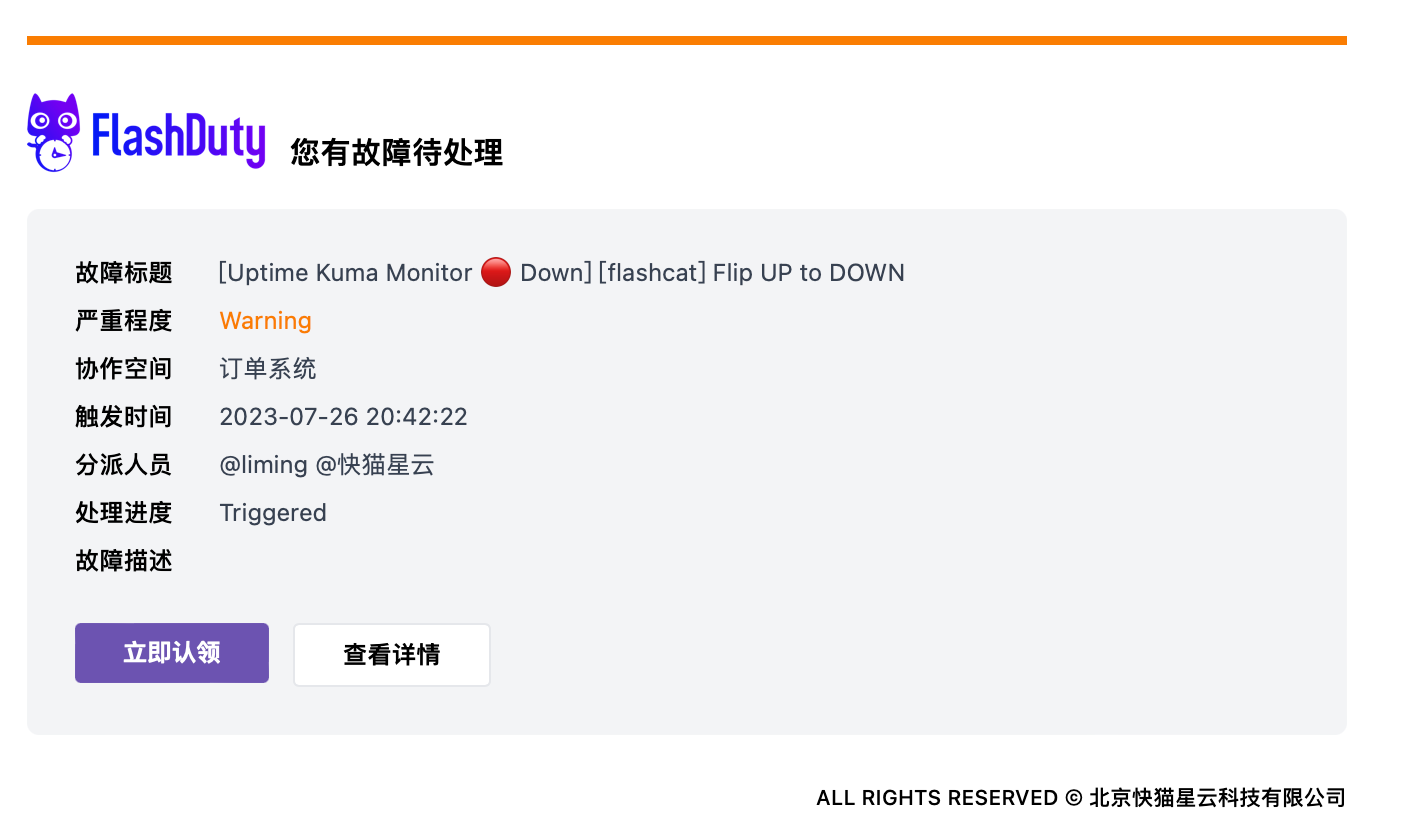
Supports full HTML format. Default template provides professional email layout including incident title, severity, channel, trigger time, responders, plus "Acknowledge Now" and "View Details" buttons.
 ## Related Topics
Define incident notification rules and escalation mechanisms
Customize notification time periods and channel preferences
## Related Topics
Define incident notification rules and escalation mechanisms
Customize notification time periods and channel preferences