> ## Documentation Index
> Fetch the complete documentation index at: https://docs.flashduty.com/llms.txt
> Use this file to discover all available pages before exploring further.
# GoogleCloudMonitoring 告警事件
> 通过 webhook 的方式同步 GoogleCloudMonitoring 告警事件到 Flashduty On-call,实现告警事件自动化降噪处理
## 在 Flashduty On-call
***
您可通过以下2种方式,获取一个集成推送地址,任选其一即可。
### 使用专属集成
当您不需要将告警事件路由到不同的协作空间,优先选择此方式,更简单。
1. 进入 Flashduty 控制台,选择 **协作空间**,进入某个空间的详情页面
2. 选择 **集成数据** tab,点击 **添加一个集成**,进入添加集成页面
3. 选择 **GCP 云监控** 集成,点击 **保存**,生成卡片。
4. 点击生成的卡片,可以查看到 **推送地址**,复制备用,完成。
### 使用共享集成
当您需要根据告警事件的 Payload 信息,将告警路由到不同的协作空间,优先选择此方式。
1. 进入 Flashduty 控制台,选择 **集成中心=>告警事件**,进入集成选择页面。
2. 选择 **GCP 云监控** 集成:
* **集成名称**:为当前集成定义一个名称。
3. 配置默认路由,并选择对应的协作空间(集成创建后可以前往 `路由` 进行更多路由规则的配置)。
4. 点击 **保存** 后,复制当前页面的新生成的 **推送地址** 备用。
5. 完成。
## 一、GoogleCloudMonitoring 告警推送配置
### 步骤1:配置告警通道
1. 登录 GoogleCloud 控制台,检索 `Monitoring` 产品,并进入对应产品控制台
2. 在左侧菜单中找到 `Alerting` 并点击 `EDIT NOTIFICATION CHANNELS` 创建通道。
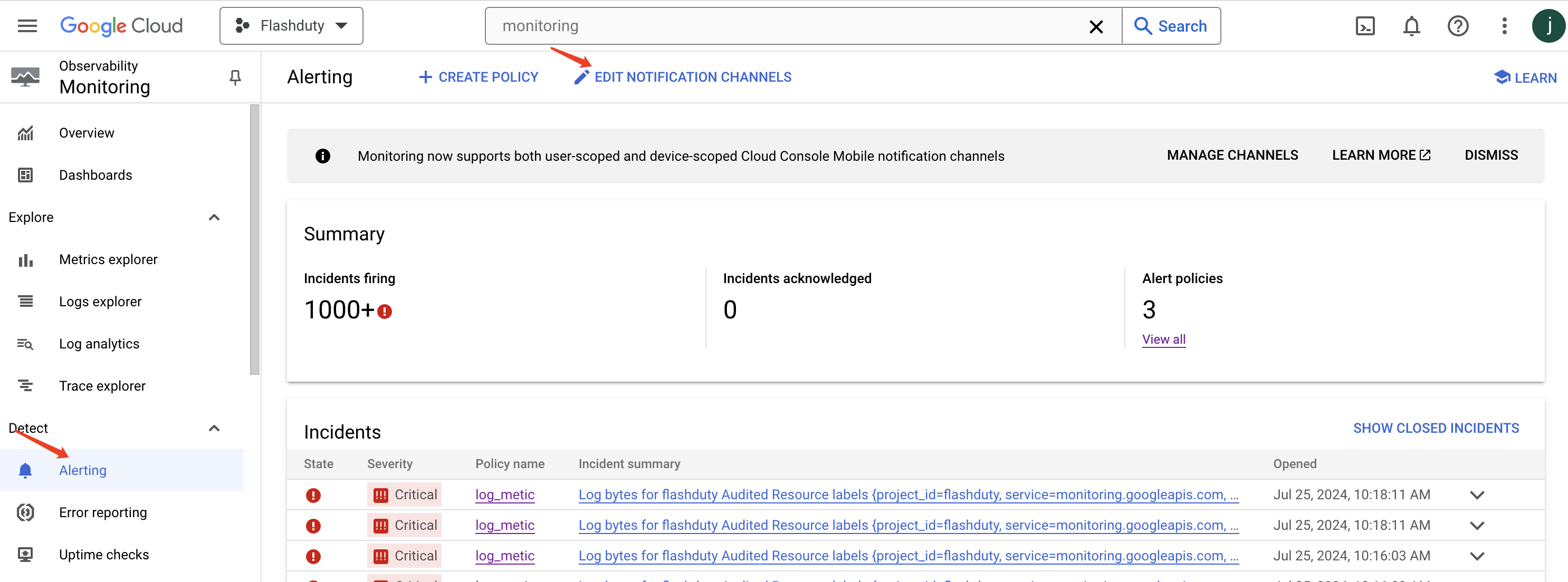
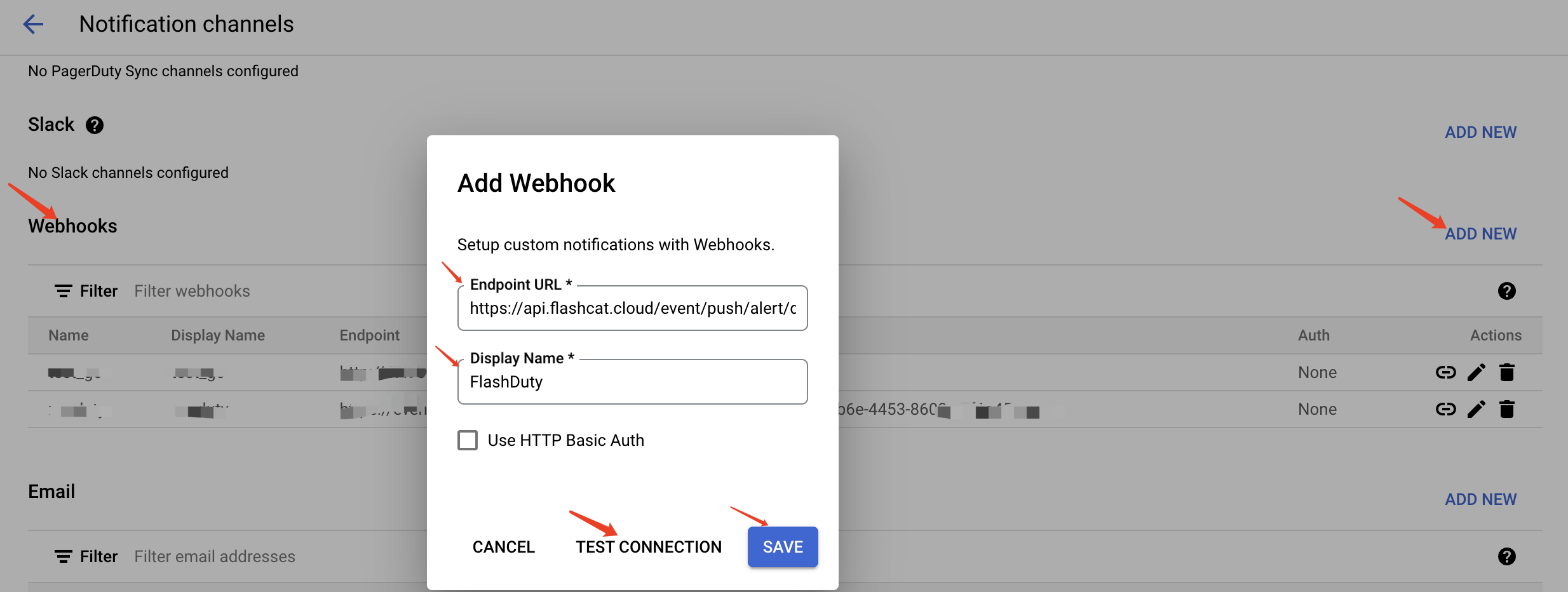
3. 在 Notification channels 页面找到 `Webhooks` 并点击 `ADD NEW`。
4. 在 `Endpoint URL` 处输入集成的推送地址(当前页面填写集成名称,保存后即可生成地址。
5. 在 `Display Name` 处输入 **Flashduty** 。
6. 点击 `TEST CONNECTION` 后,点击 `SAVE` 保存即可。
### 步骤2:在告警策略中使用 Flashduty 告警通道
1. 回到 `Alerting` 页面。
2. 创建或编辑已有的策略。
3. 此处省略其他策略配置(按业务需求配置告警条件)。
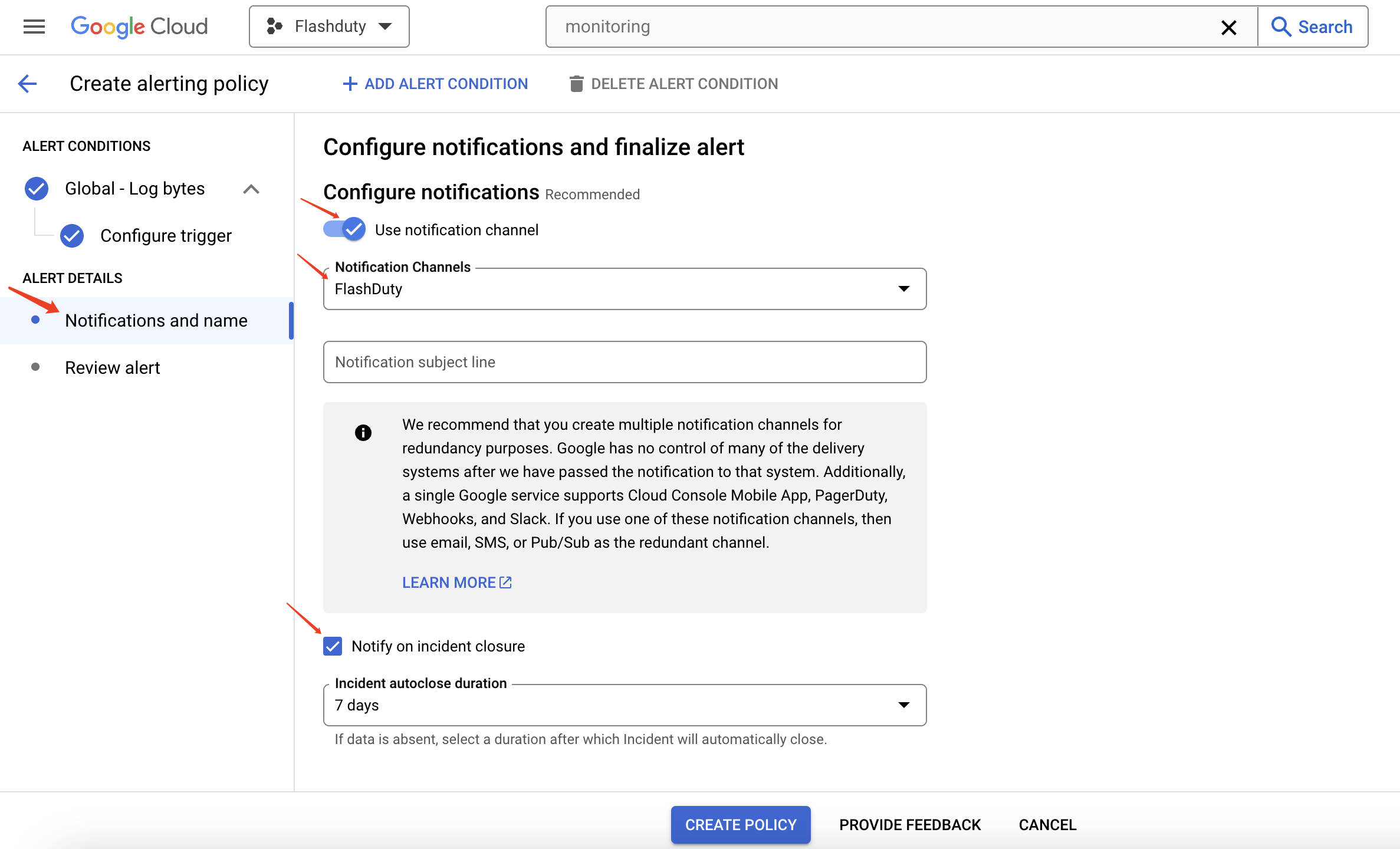
4. 在 `Notifications and name` 页面中,将 `Use notification channel` 保持开启状态。
5. 在 `Notification channels` 下拉框中选择 **步骤1** 创建的 **Flashduty** 通道,并勾选 `Notify on incident closure`。
6. 完成其他配置并保存策略即可。
| GoogleCloudMonitoring | Flashduty | 状态 |
| --------------------- | --------- | -- |
| Critical | Critical | 严重 |
| Error | Warning | 警告 |
| Warning | Warning | 警告 |
| No severity | Info | 提醒 |