

Integration methods
Choose one of three integration methods:Get application credentials
On the RUM Application Management page in the Flashduty console:- Create or select a Web application
- Get the following credentials:
- Application ID - unique application identifier
- Client Token - client access token
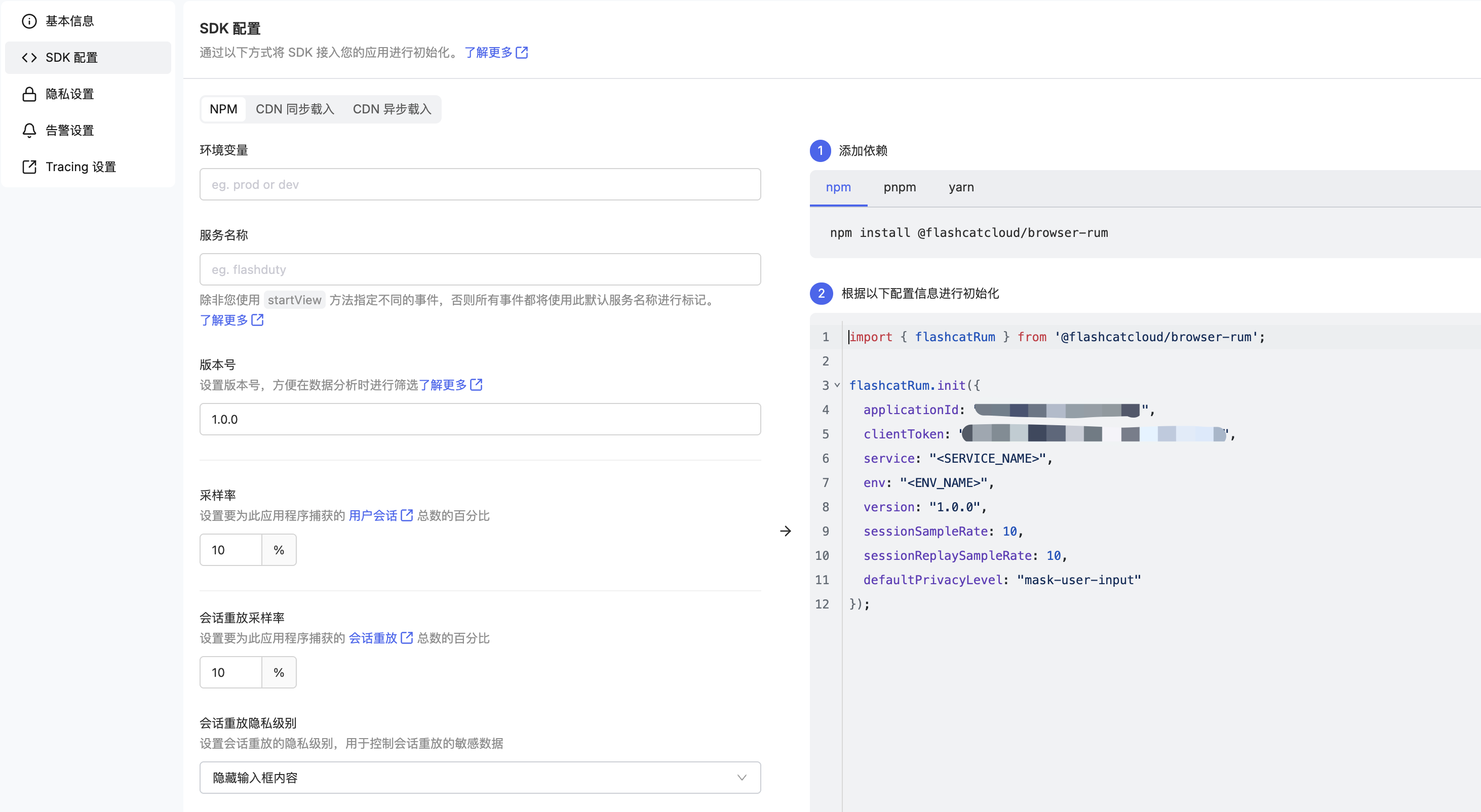
Integration code
- NPM Package
- CDN Async
- CDN Sync
Add Then initialize in your app entry file:
@flashcatcloud/browser-rum to your package.json:Initialization parameters
Required parameters
Optional parameters
Whether to read the remote configuration published in the console. Requires Web SDK 0.4.0 or later
Percentage of sessions with Session Replay enabled
Initial user tracking consent state, see User Tracking Consent
Whether to manually control view creation, see Override Default View Names
Session replay privacy policy:
allow collects all data except passwords, mask-user-input hides user input field content, and mask hides all textList of request URLs for injecting tracing headers, see Integrate RUM with Distributed Tracing
Use cases
Custom user identification
UseflashcatRum.setUser() to add identification attributes for the current user:
Adding custom tags
After initializing RUM, use thesetGlobalContextProperty API to add additional tags to all RUM events:
Sending custom Actions
Use theaddAction API to create RUM actions with context attributes:
Custom error reporting
You can attach local context to error objects through thedd_context property:
Verification
1
Check Network Requests
Open browser developer tools and check if there are data upload requests to
https://browser.flashcat.cloud/api/v2/rum in the Network panel.2
View Console Data
Access the Flashduty console to verify that RUM application data is displaying correctly.
3
Trigger User Interactions
Trigger some user interactions on the page (clicks, scrolls) to verify data collection is working.
Data typically appears in the console within 2-5 minutes.
Next steps
Advanced Configuration
Learn about advanced SDK configuration features
Data Collection
Learn about data types collected by the SDK
Insights
View and analyze RUM data