

In Flashduty
You can obtain an integration push URL through either of these two methods:
Using Private Integration
Choose this method when you don’t need to route alert events to different channels. It’s simpler.Using Shared Integration
Choose this method when you need to route alerts to different channels based on the alert event’s payload information.Configure in AWS
- Log in to the AWS console and open
Simple Notification Service - On the
Topicspage, clickCreate topic, selectStandardforType, enterFlashdutyas the name, and clickCreate topic - On the
Subscriptionspage, clickCreate subscription - Select
FlashdutyforTopic ARN,HTTPSforProtocol, and enter the integration push URL asEndpoint - Click
Create subscription
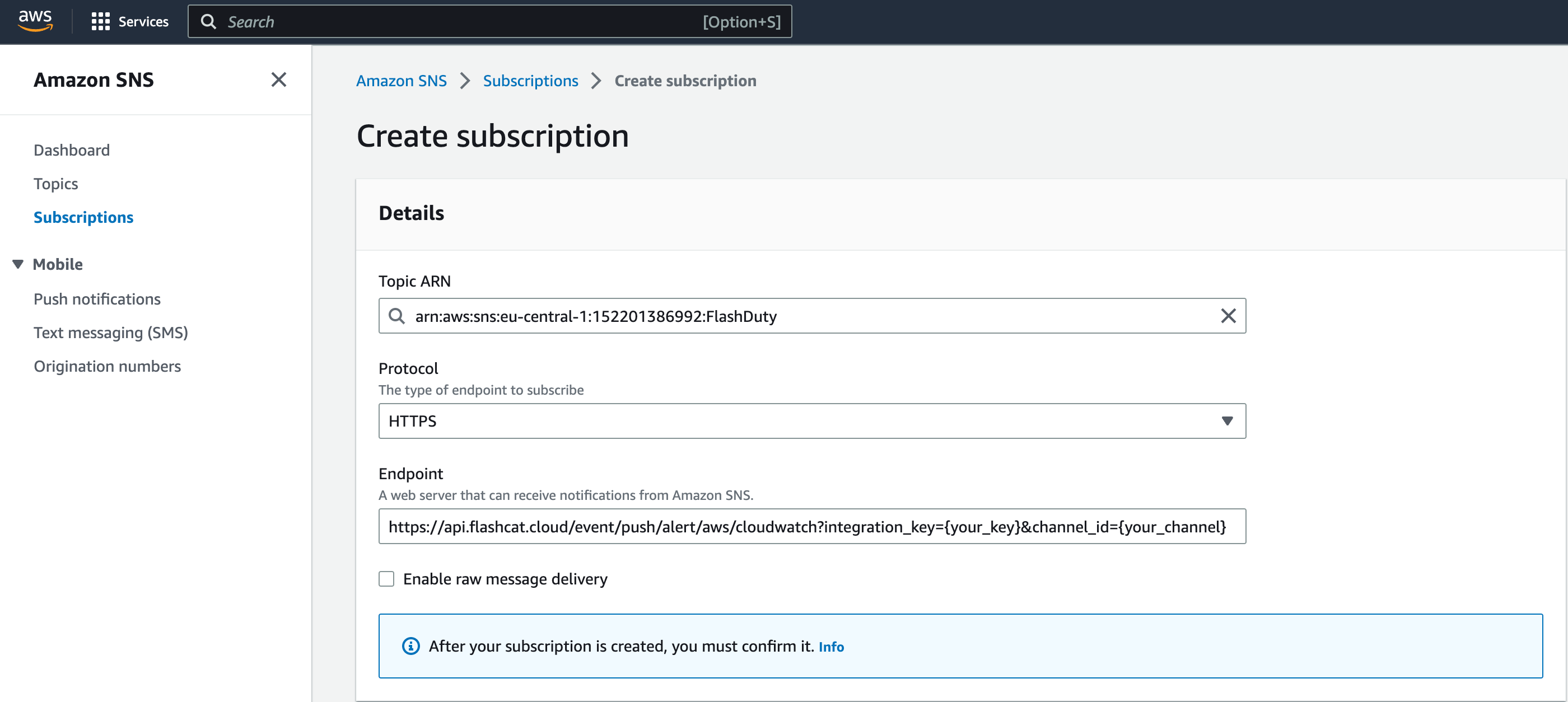
- Return to the
Subscriptionspage. The statusConfirmedmeans Flashduty has confirmed the subscription - Open the
CloudWatchconsole, go toAll alarms, and create or edit an alarm - In the
Notificationstep, select the SNS topicFlashdutyfor all three states:In alarm,OKandInsufficient data. WithoutOK, the alert does not recover automatically
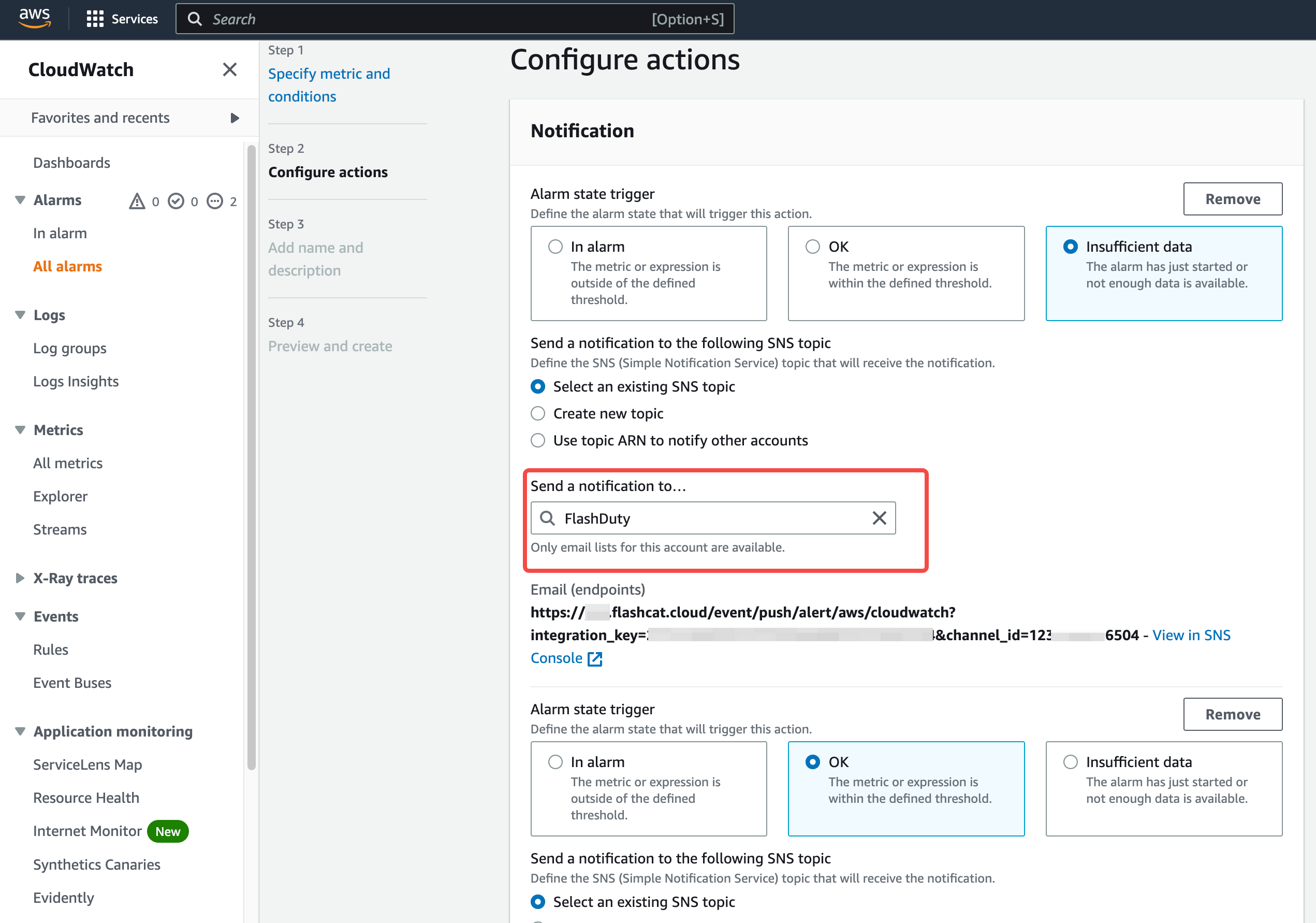
- Return to the integration list. A latest event time means events are arriving
The subscription works with Raw message delivery on or off. With raw delivery off, SNS includes the
Subject, which becomes the alert title of plain-text messages, so we recommend keeping it off.Other AWS services that publish to SNS
Send the notifications of these services to the same
Flashduty topic. No other setup is needed.
Cost Anomaly Detection
In Billing and Cost Management → Cost Anomaly Detection → Alert subscriptions, create a subscription, setAlerting frequency to Individual alerts, and select the SNS topic Flashduty as the recipient. The topic access policy must allow costalerts.amazonaws.com to publish.
Each anomaly (anomalyId) maps to one alert, and later notifications for the same anomaly merge into it. Cost Anomaly Detection sends no notification when an anomaly ends, so close the alert manually.
Amazon Managed Service for Prometheus
Add ansns_configs receiver that points to the Flashduty topic in the workspace alert manager configuration. Use the default_template from the AWS guide Configure alert manager to send messages to Amazon SNS as JSON so that messages are sent as JSON:
- Each alert gets its
fingerprintas the Alert Key.firingtriggers andresolvedrecovers - A
severitylabel ofcritical,warningorinfomaps to Critical, Warning or Info; any other value maps to Warning - Labels and annotations become Flashduty labels. The title is the
summaryannotation, oralertnamewhen it is absent
AWS Budgets
In the budget Alert settings, choose Amazon SNS Alerts and enter the ARN of theFlashduty topic. The topic access policy must allow budgets.amazonaws.com to publish. Budgets notifications are plain text and are handled as described in “Other messages” below.
Other messages
Each unrecognized message (plain text or other JSON) creates one Warning alert. The Alert Key is the SNSMessageId, so an SNS retry of the same message does not create a second alert. The title is the SNS Subject, or the first line of the message when there is no subject. These alerts do not recover automatically.
Alert Key
ALARM, INSUFFICIENT_DATA and OK of a CloudWatch alarm share one Alert Key; changes to the alarm name, threshold, reason or description do not split the alert. A CloudWatch alarm message without AlarmArn is rejected.
Status and severity
CloudWatch alarms have no severity.
ALARM and INSUFFICIENT_DATA map to Warning by default, and OK recovers the alert.To set a severity, add flashduty_severity: critical to the alarm’s Alarm description (critical, warning or info, case-insensitive, with : or =). For example:Labels
- Single-metric alarms:
trigger_metric_name,trigger_namespace,trigger_dimensions_<dimension name>and more. When the dimensions includeInstanceId, it is written toresource - Metric math and anomaly detection alarms: each query writes
trigger_expression_<query ID>,trigger_metric_<query ID>(namespace/metric name) andtrigger_dimensions_<dimension name>.metricandcheckcome from the query that returns data - Composite alarms:
alarm_ruleandtriggering_children(ARNs of the child alarms that triggered) - All alarms:
alarm_arn,aws_account_id,region,new_state_value,old_state_value
Troubleshooting
- Subscription stays in
Pending confirmation: Make sure the endpoint is the full push URL includingintegration_key, then run Request confirmation on the subscription in the SNS console - Flashduty returns a SubscribeURL error: Flashduty only visits subscription confirmation URLs on
sns.<region>.amazonaws.com,sns.<region>.amazonaws.com.cnandsns.<region>.amazonaws.eu. Make sure the subscription request comes from Amazon SNS - Alert does not recover: Make sure the
OKstate of the CloudWatch alarm also notifies theFlashdutytopic - Handling events in EventBridge: For GuardDuty, Security Hub, AWS Health and similar events, use the AWS EventBridge integration