

In Flashduty On-call
You can get the integration push URL in either of the following ways.Use a dedicated integration
Choose this option if all alerts go to one channel. It’s the simpler setup.View dedicated integration setup steps
View dedicated integration setup steps
- In the Flashduty console, select Channel and open a channel
- Select Configuration → Integrations → Private integration, then click Add integration
- Choose Volcengine RTC integration and click Save to generate a card
- Open the generated integration card and copy the Push URL
Use a shared integration
Choose this option if you need to route alerts to different channels based on the alert payload.Configure in Volcengine RTC
1
Create an alert rule in the Volcengine RTC console and enter the callback URL
Where: Volcengine console › Real-Time Communication › Monitoring › Alert Notifications › Alert Rules › Create Rule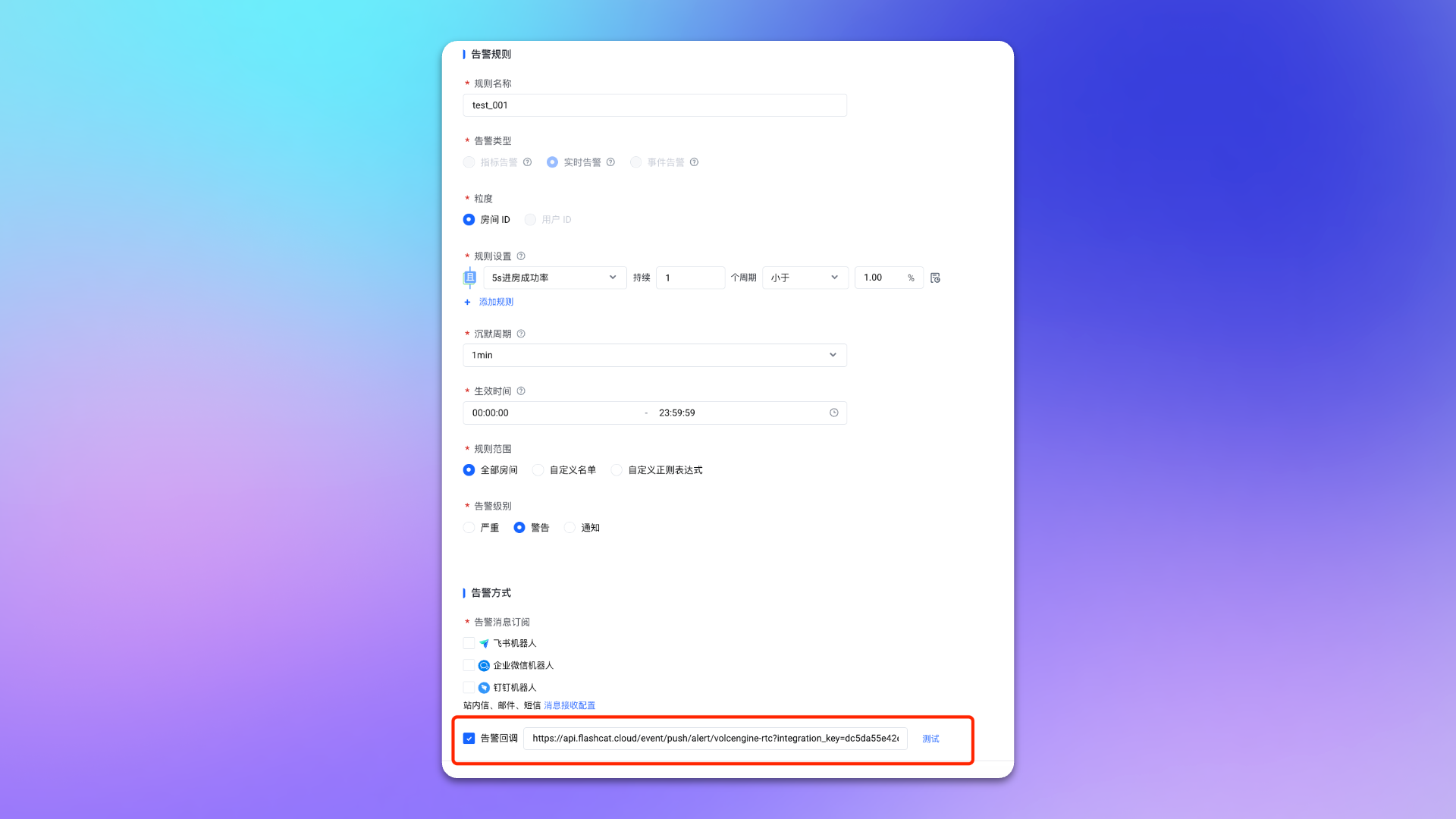
Click
Confirm to finish.2
Enable the rule and confirm
Where: Volcengine console › Real-Time Communication › Monitoring › Alert Notifications › Alert RulesFind the new rule in the list and click
Enable. The rule takes effect only after it is enabled. Wait for the rule to trigger (you can lower the threshold temporarily to trigger it once).Back in Flashduty, the integration shows a Latest event time, which means the setup works.Severity and event handling
Volcengine RTC alert callbacks carry no level: whether the rule level is Critical, Warning or Notice, Flashduty always maps it to Warning.- Every push gets a fresh alert key, so each callback is a separate alert.
- The callback contains no recovery notice, so alerts never recover automatically and must be closed manually in Flashduty. (No-event detection only raises its own alert when RTC stops pushing entirely; it does not close these alerts.)
- The alert title is
<check>::<alert_type>, built from the callback’s check and alert_type values.